PC support software for 2245 and 2255
Standard versions
The standard version of the PC software can be installed by running the setup.exe files on the main download page Software And APPS for B&K 2245 and HBK 2255
Alternatively, they can be installed from the links below:
- Install Noise Partner
- Install Enviro Noise Partner
- Install Building Acoustics Partner
- Install Work Noise Partner
- Install Product Noise Partner
These versions are for PC's with normal Intel processors (x64). If installed on PC's with ARM processors the software will run emulated and will not support cabled connections from the sound level meter to PC.
Hardened versions
Hardened versions of the software have been created for customers with high focus on security aspects. To reduce the attack surfaces on the software a number of components have been removed from the software. In order to use some features it may therefore be necessary to install additional components. The software will guide you when this is needed. The hardened versions can be installed using these links:
Installation and uninstallation
The software will install in the users AppData\Local folder, e.g.: 'C:\Users\userName\AppData\Local\Bruel_and_Kjaer_BuildingAcoustics_Partner'.
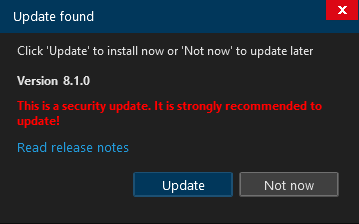
Software updates will be notified on program startup when available and can easily be installed from here. If an update contains critical security fixes this is marked clearly on the update dialogue.
You can uninstall the software again using the Windows control panel (Installed Apps) or by running 'Update.exe --uninstall' from the installation folder, e.g.: 'C:\Users\userName\AppData\Local\Bruel_and_Kjaer_BuildingAcoustics_Partner\Update.exe --uninstall'
From Noise Partner 2.4.0, Enviro Noise Partner 2.4.0 and Building Acoustics Partner 1.9.0 the installation folder can be controlled during install time by specifying the 'installto' option when running the setup.exe which will install the software into the specified folder. To e.g. install to 'C:\Program Files\Bruel and Kjaer\ENP' do the following:
- Create folder 'C:\Program Files\Bruel and Kjaer\ENP'
- Run: 'Setup.exe --installto "C:\Program Files\Bruel and Kjaer\ENP"'
Note: If installing the software as a different user (for instance an admin installing for a standard user) shortcuts and uninstall information will not be added to all users and the software will show an exception on the very first startup during install (performed as an admin user). These issues will be improved in Noise Partner 2.5, Enviro Noise Partner 2.5 and Building Acoustics Partner 2.0 where msi installation files will be offered as an alternative to the setup.exe files.
ffplay and ffmpeg
When playing back MP3, WAV and FLAC audio the software uses an external component ffplay to gain, auto gain and speed up the playback. Similarly, when exporting FLAC files to WAV files an external component ffmpeg is used. The standard versions of the software are distributed with the latest stable version of ffplay and ffmpeg from FFmpeg-Builds/releases (currently ffmpeg-n9.0-latest-win64-lgpl-9.0.zip) but any version can be used. In the hardened versions you need to manually install ffplay and ffmpeg and then point to these from the software. Both in the standard track and the hardened track you can specify the location of ffplay and ffmpeg on the options page.
Disabling features using IT policies
From Noise Partner 2.4.0, Enviro Noise Partner 2.4.0 and Building Acoustics Partner 1.9.0 some features in the products can be disabled using IT policies. This can be done by adding the following registry settings:
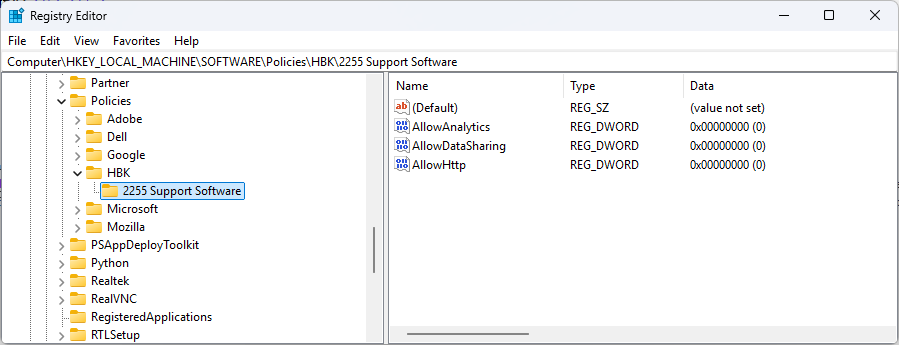
When a feature is disabled this is clearly indicated on the options page by the flag 'Managed by your organization' which will be added to each disabled feature.